 English
 Italian
 Spanish
 Turkish
 Portuguese
 Dutch
 Korean
 Russian
 French
 German
 Polish
 Arabic
 Hindi
Portable Smart TV vs Smart Monitor: Which Is Right for You?
A screen that moves from the living room to the bedroom, home office, or fitness area can make everyday entertainment and work more flexible. However, choosing between a portable smart TV and a portable smart monitor is not simply a matter of screen size or appearance. The two devices can serve different purposes depending on their operating systems, content access, connectivity, interaction features, and intended applications.
A portable smart TV is generally designed to combine television-style entertainment with the flexibility of a movable display. A portable smart monitor, on the other hand, usually focuses on providing a versatile screen for computers, mobile devices, and other external sources. Some models also include smart operating systems and built-in applications, which means the distinction is not always absolute.
For buyers comparing these two categories, the most important question is how the display will be used throughout the day. A household looking for convenient streaming and family entertainment may have different priorities from a remote worker who needs a larger workspace or a business purchasing displays for multiple applications.
This guide compares portable smart TVs and portable smart monitors across their main functions, practical applications, and purchasing considerations to help identify the right solution for different environments.
What Is the Difference Between a Portable Smart TV and a Portable Smart Monitor?
The main difference lies in the primary purpose of each device.
A portable smart TV is built around independent entertainment. It typically combines a display panel, an operating system, wireless connectivity, audio output, and access to compatible streaming or media applications. Users can access supported content without necessarily connecting a computer or another external device.
A portable smart monitor is primarily designed as a flexible display for other devices. It can connect to laptops, desktop computers, smartphones, gaming consoles, and other compatible equipment. Depending on its configuration, it may support touch input, wireless screen sharing, or built-in smart functions.
The word "portable" describes the form factor rather than a standardized feature set. One product may have a rechargeable battery and rolling stand, while another may be lightweight and intended for desk use. Buyers should therefore evaluate the actual specifications rather than assume that every portable display offers the same capabilities.
Portable Smart TV: Entertainment-Focused Functionality
A portable smart TV is suitable for users who want a screen that can support independent entertainment in different parts of a home or other environment.
Typical functions may include:
A built-in smart operating system.
Access to compatible streaming and media applications.
Wi-Fi and Bluetooth connectivity.
Integrated speakers.
Wireless content sharing, where supported.
Rechargeable battery options on selected models.
A mobile stand or adjustable screen structure on certain designs.
The combination of smart functions and mobility makes this category useful for households that do not want entertainment to remain tied to one fixed television location.
Portable Smart Monitor: Flexible External Display Support
A portable smart monitor is often selected for productivity, connectivity, and screen expansion.
Its common applications include:
Extending a laptop workspace.
Connecting to a desktop computer.
Displaying content from compatible mobile devices.
Providing a larger screen for presentations.
Supporting external gaming equipment.
Acting as a secondary screen for video meetings.
Some smart monitors include their own operating systems and applications. Others require an external device for most content and software functions. This distinction should be checked before purchase.
Portable Smart TV vs Portable Smart Monitor: Key Differences
Although both products can provide flexible viewing, their configurations and intended uses can vary considerably.
| Comparison Factor | Portable Smart TV | Portable Smart Monitor |
|---|---|---|
| Primary purpose | Independent entertainment and general viewing | External display and productivity |
| Operating system | Often built in | Varies by model |
| Streaming applications | Available on compatible smart models | Depends on built-in software or connected devices |
| Computer connection | Supported through available interfaces | Commonly a primary function |
| Mobile device connection | Wireless or wired, depending on compatibility | Wireless or wired, depending on compatibility |
| Audio | Often includes integrated speakers | Varies by model |
| Touch interaction | Available on selected models | Available on selected models |
| Mobility | May include a rolling stand or battery | Depends on its design |
| Best suited for | Home entertainment and flexible viewing | Computer-based work and external display tasks |
These are general product-category differences, not universal technical specifications. Actual capabilities depend on the hardware, software, and configuration of each model.
Operating System and Built-In Applications
One of the most important purchasing considerations is whether the screen can operate independently.
A portable smart TV with an integrated operating system can provide access to compatible applications, media services, and system settings directly from the display. This reduces the need to connect an additional computer or streaming device for everyday entertainment.
A traditional portable monitor may function mainly as an external screen. It displays content from a connected source rather than independently running entertainment applications.
However, the market also includes smart monitors with Android-based systems and other built-in software platforms. For this reason, the product specification should clearly identify the operating system, available applications, memory configuration, and supported software updates.
Connectivity and Device Compatibility
Connectivity determines how easily a display fits into an existing environment.
For a portable smart TV, buyers may prioritize:
Wi-Fi connectivity for online content.
Bluetooth for compatible audio devices and accessories.
HDMI for external media players and gaming equipment.
USB for supported media playback and peripherals.
Wireless screen sharing for compatible smartphones and computers.
Portable monitors are frequently evaluated according to their input interfaces, supported resolutions, refresh rates, and compatibility with laptops or mobile devices.
USB-C is particularly important when a buyer expects a single-cable connection. However, a USB-C connector does not automatically guarantee video transmission or device charging. The connected equipment and display must support the required protocols and power delivery.
HDMI remains useful for connecting a wide range of external devices, although supported resolutions and refresh rates depend on the interface version and hardware configuration.
Which Is Better for Home Entertainment?
For households that prioritize streaming, family viewing, and everyday entertainment, a portable smart TV is often the more convenient option.
A smart display with its own operating system can provide direct access to supported entertainment applications. Family members can watch movies, follow online programs, or enjoy other compatible content without setting up a laptop every time.
Mobility also creates more flexible viewing arrangements.
Moving Entertainment Between Rooms
A fixed television is generally installed in one location. A portable smart TV with a suitable mobile stand can be repositioned when household needs change.
For example:
In the living room, it can provide an additional viewing screen.
In the bedroom, it can support personal entertainment.
In the kitchen, it can display compatible cooking videos and online content.
In a family activity area, it can support shared viewing.
The usefulness of this arrangement depends on the stand structure, screen weight, floor conditions, power requirements, and available space.
A portable smart monitor can also serve as a secondary entertainment screen, but the experience may require a connected laptop, phone, streaming device, or compatible smart platform.
Family Viewing and Shared Content
Integrated speakers and independent smart functions can make a portable smart TV easier to use for casual family entertainment.
A portable monitor may be more suitable when the household already relies on computers or external media devices and wants an additional screen.
The better choice depends on how content is accessed. Families that prefer direct application access may favor a smart TV, while users who frequently switch between external devices may appreciate a monitor-oriented design.
Is a Portable Smart Monitor Better for a Home Office?
A portable smart monitor can be a practical choice for users whose daily work revolves around a laptop or desktop computer.
An additional display provides more room for arranging documents, spreadsheets, browser windows, communication software, and reference materials. This can reduce the need to switch repeatedly between windows.
For example, a remote worker might keep a video meeting open on one screen while reviewing documents on another. A designer may use an external display for reference images, while a business professional may use it to review presentations and reports.
When a Portable Smart TV Can Also Support Work
A portable smart TV can provide useful workplace functions when it supports the required connections and software.
A compatible model may serve as:
A larger screen for presentations.
An additional display for remote collaboration.
A screen for online training.
A viewing device for business content.
A flexible display for temporary work areas.
However, buyers should verify whether the display supports the computer connection methods they need. They should also consider text clarity, screen resolution, input response, and viewing distance.
A television-style smart interface is not necessarily a replacement for desktop productivity software. Users who need to run specialized computer applications should connect an appropriate computer or select a monitor designed for that workflow.
Important Features for Office Use
A portable smart monitor for home office applications should be evaluated according to several practical factors.
Resolution and text clarity: Higher resolution can provide more workspace and sharper text, although screen size and viewing distance also affect the experience.
Refresh rate: Standard office tasks may not require a high refresh rate, but smooth cursor movement and scrolling can improve the overall experience.
Input compatibility: Confirm that the monitor supports the laptop's available video output.
Adjustability: Height, tilt, rotation, and viewing angle can influence comfort during extended work sessions.
Audio and camera support: Users who attend frequent online meetings should check whether speakers, microphones, cameras, or external accessories are supported.
For users who need both independent entertainment and occasional office use, a portable smart TV with appropriate external connectivity may offer a useful combination.
Portable Smart Display Applications Beyond the Living Room
The value of a movable screen becomes clearer when it can serve different purposes throughout the day.
Both portable smart TVs and portable smart monitors can support multiple scenarios, although their suitability depends on their hardware and software configurations.
Home Fitness and Online Workouts
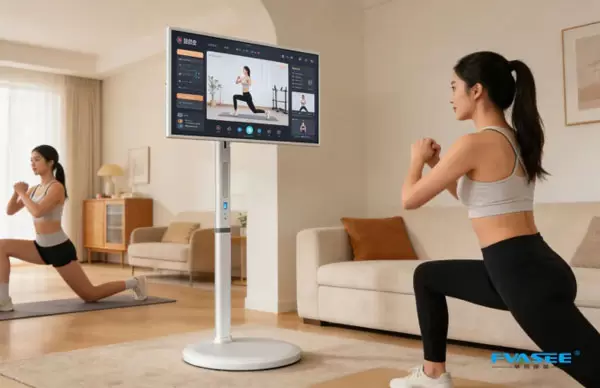
A portable smart TV can display workout videos, exercise instructions, and compatible fitness applications.
A larger screen can make demonstrations easier to follow than viewing instructions on a smartphone. A movable structure also allows the display to be positioned where the workout takes place.
For fitness use, buyers should consider screen positioning, stand stability, wireless connectivity, speaker performance, and ease of cleaning.
Online Learning and Personal Study
A portable smart display can provide a larger viewing area for online courses, tutorials, and educational content.
A smart TV with compatible applications may be suitable for watching lessons independently. A portable monitor connected to a computer can provide more flexibility for interactive learning platforms, document editing, and multitasking.
Students and families should check the available software, external device compatibility, and whether the screen supports the interaction methods required by their learning applications.
Video Calls and Family Communication
A larger display can make remote conversations more comfortable, particularly when several family members participate in a call.
However, video calling requires more than a screen. Buyers should verify camera availability, microphone support, compatible applications, network performance, and privacy controls.
A display with no integrated camera may still support video communication through a compatible external webcam or connected computer.
Hospitality and Shared Spaces
Hotels, serviced apartments, and other accommodation providers may consider portable smart displays when they need flexible entertainment arrangements.
A portable smart TV can provide a more adaptable viewing setup in spaces where permanent television installation is inconvenient.
For commercial use, buyers should also evaluate centralized management requirements, content restrictions, network security, maintenance arrangements, and the suitability of the device for continuous operation.
What Specifications Should Buyers Compare?
Product specifications provide a more reliable basis for comparison than category names alone.
A portable smart TV and a portable smart monitor may have similar screen dimensions but very different internal hardware and connection options.
The following checklist can help narrow down the selection.
Display Size and Resolution
Screen size should match the intended viewing distance and available space.
Smaller displays may be suitable for personal viewing, compact work areas, and temporary use. Larger displays can be more practical for shared entertainment, presentations, and group viewing.
Resolution should be evaluated alongside screen size. A larger panel does not automatically provide sharper images. Buyers should confirm the actual native resolution rather than rely on general descriptions such as HD, Full HD, or 4K.
Operating System and Hardware
For a smart TV, check the operating system version, processor, RAM, available storage, application compatibility, and software update policy.
For a monitor, the main priorities may include panel performance, input compatibility, color reproduction, and support for the intended connected devices.
If a smart monitor includes an operating system, evaluate it in the same way as a smart TV.
Battery and Power Options
A battery-powered smart display can offer greater flexibility when a suitable power outlet is not immediately available.
However, battery capacity alone does not establish actual operating time. Screen brightness, processing activity, wireless connectivity, audio volume, and application usage can all affect power consumption.
Buyers should request the manufacturer's stated runtime and clarify the conditions under which it was measured.
For products used mainly in offices or fixed locations, continuous power operation may be more important than battery capacity.
Stand Design and Mobility
A portable display should be easy to position and safe to move.
Consider:
Rolling base quality.
Wheel locking mechanisms.
Height adjustment.
Screen rotation and tilt.
Overall weight.
Stand stability.
Cable management.
A mobile stand can improve placement flexibility, but it should also provide adequate support for the display during normal operation.
Touchscreen and Audio
Touch functionality can be useful for interactive applications, drawing, navigation, and certain learning activities.
However, not every portable smart TV or portable smart monitor includes a touchscreen. The touch technology, number of supported touch points, operating system compatibility, and software support should all be confirmed.
Integrated speakers are useful for casual viewing and communication. Buyers with higher audio requirements may prefer external Bluetooth or wired audio equipment, subject to compatibility.
A Real-World Product Example: FVASEE Portable Smart TV
FVASEE offers portable smart TV products in several screen sizes, including 21.5-inch, 24-inch, 27-inch, and 32-inch options.
These products are designed around flexible viewing, with configurations that can include mobile stands, smart functions, and different connectivity options.
One example is the FVASEE 27-inch Portable Smart TV, which is listed with a rolling base, height adjustment, and a Full HD display.
The published 32-inch model specification provides a more detailed example of the hardware available in a particular configuration:
Screen size: 32 inches.
Native resolution: 1920 × 1080 Full HD.
Refresh rate: 60 Hz.
Operating system: Android 13.
RAM: 8 GB.
Wi-Fi: 802.11 a/b/g/n/ac.
Bluetooth: 5.0.
HDMI: 1.4.
Built-in lithium-ion battery: 7,800 mAh.
Touch technology: Projected capacitive touch.
Touch points: 10.
These specifications apply to the published 32-inch configuration and should not be assumed to apply to every FVASEE model.
For buyers comparing a portable smart TV with a portable smart monitor, this type of product information is useful because it shows how a movable entertainment display can combine an operating system, wireless connectivity, external interfaces, battery power, and touch interaction.
The most appropriate configuration still depends on the intended application. A buyer who mainly needs a computer-connected screen should prioritize input compatibility and monitor performance. A buyer who wants independent entertainment should pay closer attention to the smart system, supported applications, speakers, and power options.
How to Choose the Right Device for Your Needs
A simple way to make the decision is to begin with the most frequent task rather than the product category.
| Your Main Requirement | Recommended Direction |
|---|---|
| Streaming and independent entertainment | Portable smart TV |
| Watching content in different rooms | Portable smart TV with suitable mobility features |
| Laptop screen expansion | Portable smart monitor |
| Computer-based productivity | Portable smart monitor |
| Family entertainment and casual viewing | Portable smart TV |
| External device connectivity | Compare available inputs on both categories |
| Touch-based interaction | Select a model with confirmed touchscreen support |
| Video meetings | Check camera, microphone, software, and connection compatibility |
| Entertainment and occasional office use | A smart TV with suitable external display support |
Questions to Ask Before Buying
Before selecting a device, consider the following questions:
Will the screen operate independently, or will it always connect to another device?
Which applications and software platforms are required?
Does the device support the laptop, smartphone, or gaming equipment already in use?
Is a rechargeable battery necessary?
Will the display be moved frequently?
Is a rolling stand, adjustable height, or touchscreen important?
Does the screen size match the viewing distance and available space?
Are the audio, camera, and microphone features sufficient for the intended use?
Is the product intended for personal use, business use, or commercial deployment?
Answering these questions can prevent buyers from paying for functions they do not need or choosing a display that cannot support their daily workflow.
Final Verdict: Portable Smart TV or Portable Smart Monitor?
The choice between a portable smart TV and a portable smart monitor depends primarily on how the screen will be used.
A portable smart TV is generally the stronger option for households and users who want independent entertainment, built-in smart functions, and flexible viewing arrangements. It can be particularly useful when the same display needs to serve different rooms and activities.
A portable smart monitor is often more suitable for computer-centered tasks, external device connections, and productivity workflows. It provides a practical option for users who need an additional screen rather than an independent entertainment system.
Some modern smart displays combine features from both categories, making it possible to support entertainment, work, communication, and interactive applications in one device. In these cases, checking the actual operating system, connectivity, display specifications, and mobility features is more important than relying on the product name.
For households, retailers, distributors, and businesses evaluating movable display solutions, FVASEE provides portable smart TV options in multiple screen sizes and configurations. Buyers can compare the available models and select specifications according to their intended applications.
If you are planning a portable smart display project, evaluating products for distribution, or looking for an OEM/ODM manufacturing partner, visit the FVASEE product range or Contact Us to discuss your requirements and suitable product configurations.