 English
 Italian
 Spanish
 Turkish
 Portuguese
 Dutch
Dutch Korean
 Russian
 French
 German
 Polish
 Arabic
 Hindi
HindiSelf Service Query Printing Terminals for Faster Public Service
Public service environments handle a large number of repetitive requests every day. Visitors may need to check application progress, confirm appointment details, search for service information, obtain queue numbers, or print documents before completing the next step.
These tasks do not always require staff intervention.
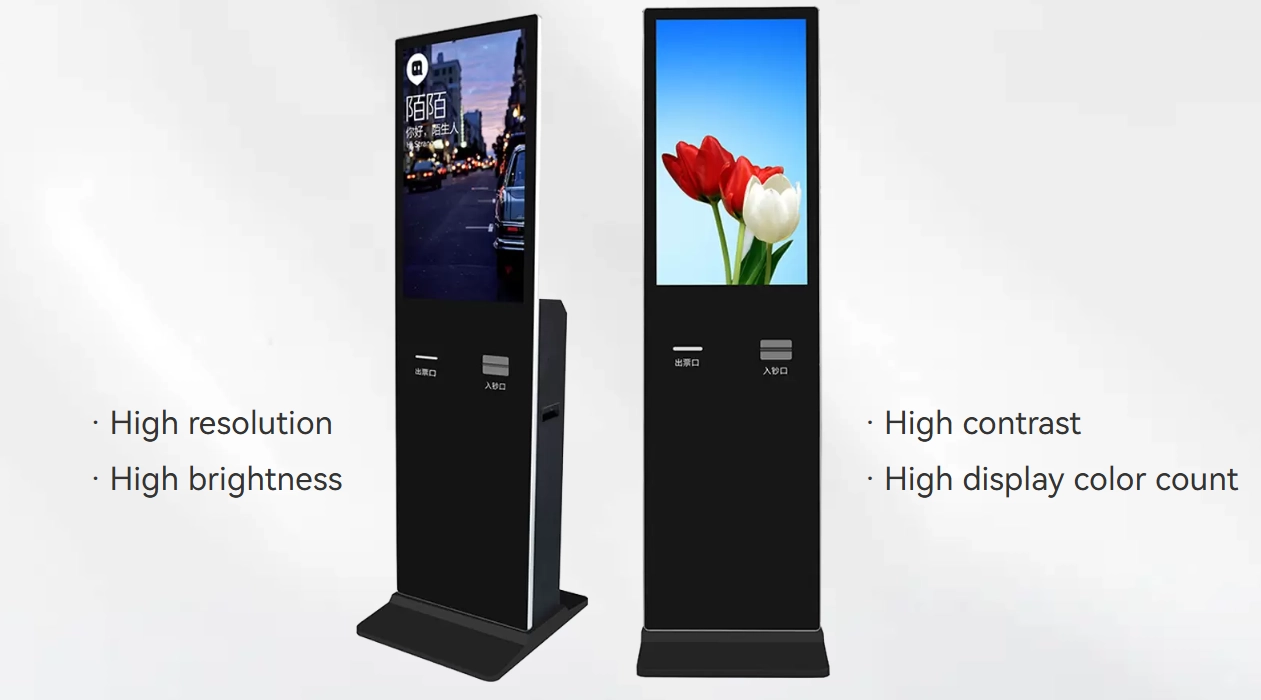
A well-designed self service terminal can handle routine information requests while allowing employees to focus on cases that require direct assistance. When the same terminal also provides printing, the process becomes more complete. Users can search for information, confirm the result, and obtain a physical document without moving to another counter or waiting for an employee.
This is the practical value of a self service query printing terminal.
The product should not be viewed simply as a touchscreen combined with a printer. It is a service point that connects information access, user interaction, document output, and equipment management in one enclosure. For government offices, hospitals, banks, transportation facilities, educational institutions, and commercial properties, that distinction matters because the equipment must perform reliably under repeated public use.
The strongest solution is therefore not necessarily the one with the largest screen or the longest feature list. It is the one that removes unnecessary steps from the user's journey while remaining straightforward for staff to operate and maintain.
Query and Printing Work Better as One Service Process
Information lookup and document printing are often treated as separate functions, but many real-world service processes naturally connect the two.
Consider a visitor checking an application status. Finding the information on screen may be enough in some situations. In others, the visitor may need a printed confirmation for a later appointment, an application reference, a queue number, or another physical record.
If the terminal only provides information, the user may still need to approach a service counter to obtain the document.
The workflow becomes longer:
Search → Confirm Information → Find Staff → Wait → Print
With an integrated terminal, the same process can become:
Search → Confirm Information → Print
That reduction in steps is one of the strongest reasons to integrate printing into a touch screen kiosk.
It can also reduce repeated questions at service counters. When users can independently access standardized information, staff have more time to handle complicated requests, identity verification, exceptions, and cases that genuinely require human judgment.
From a product planning standpoint, the goal is not to eliminate staff interaction. It is to allocate staff time more effectively.
A Self-Service Terminal Should Follow the User's Task
A public-facing terminal has very little tolerance for complicated operation.
Users may have different ages, levels of technical familiarity, languages, and physical abilities. Some may use the equipment for the first time. Others may be in a hurry and expect to complete a simple task within seconds.
The interface should therefore follow the user's objective rather than the internal structure of the software.
For a typical query and printing process, the interface might follow this sequence:
1. Select the required service
2. Enter or scan the necessary information
3. Review the retrieved result
4. Confirm the information
5. Choose whether a printed copy is required
6. Collect the document and finish the session
Each additional step creates another opportunity for confusion or abandonment.
This is particularly important for a government information kiosk, where the terminal may serve hundreds of visitors with very different levels of familiarity with digital systems.
Clear instructions, large touch targets, logical navigation, and visible confirmation messages can make the difference between a smooth self-service process and a queue of users waiting for assistance.
Touch Interaction Determines Whether Self-Service Feels Simple
The touchscreen is the primary communication point between the user and the terminal.
However, good touch interaction is not simply a matter of having a responsive panel. The complete interface needs to make the next action obvious.
For a touch screen terminal, product design should consider:
· Screen height and viewing angle
· Button size and spacing
· Text readability
· Response feedback
· Menu structure
· Language selection
· Error messages
· Session reset after use
The physical display and software interface should work together.
For example, if a user needs to enter an application number, the virtual keypad should be large enough for quick input. If the system retrieves several records, the result page should make the correct selection obvious. If printing requires confirmation, the confirmation screen should clearly indicate what will be printed.
These details may appear minor during development, but they become significant when a terminal is used continuously by people who have never seen the system before.
Printing Adds Practical Value to Digital Information
The shift toward digital services does not eliminate the need for printed documents.
Many service environments still require users to carry physical information from one location to another. A printed document may serve as a receipt, confirmation, reference number, appointment record, ticket, or supporting document.
This makes the printer an operational component rather than an accessory.
A self service printing kiosk should be designed around the expected printing workload. A terminal used occasionally in a corporate reception area has very different requirements from one installed in a busy government service center.
Procurement teams should consider:
· Expected print volume
· Printing speed
· Paper capacity
· Paper replacement frequency
· Output size and format
· Printer accessibility
· Paper jam handling
· Maintenance requirements
The printer should also be positioned so that users can easily collect documents without obstructing the main interaction area.
For high-traffic locations, easy access for maintenance personnel is equally important. Staff should be able to replace paper or clear common faults without dismantling the entire enclosure.
Public Locations Put Greater Demands on Equipment Design
A self-service terminal installed inside a public building faces different conditions from an office workstation.
It may be used continuously throughout the day, touched by hundreds of people, and exposed to accidental impacts, repeated cleaning, and general wear.
The enclosure therefore needs to balance appearance with practical durability.
A commercial terminal may require:
· A rigid metal or reinforced enclosure
· Impact-resistant front protection
· Stable floor or wall mounting
· Protected internal wiring
· Accessible service compartments
· Easy-to-clean external surfaces
The physical design should also prevent users from interfering with internal components.
This is particularly important for terminals placed in unsupervised public areas. The equipment needs to remain functional even when users do not handle it with the same care as employees would.
Different Locations Require Different Terminal Configurations
The best terminal design depends on where it will be installed and what users need to accomplish.
Application | Typical Service | Important Considerations |
Government Service Center | Application and status queries | Clear interface, document printing, high daily usage |
Hospital | Appointment and registration information | Simple operation, accessibility, privacy |
Bank | Account or service information | Security, transaction support, receipt printing |
Transportation Hub | Schedule and passenger information | Fast response, high traffic, easy operation |
Educational Institution | Campus and administrative information | Multi-language support, document output |
Commercial Facility | Directory and service lookup | Attractive enclosure, intuitive navigation |
A terminal intended for a hospital may prioritize accessibility and privacy, while one installed in a transportation hub may need to process users quickly during peak periods.
This is why a standardized product can still require application-specific configuration.
Screen size, printer type, operating system, enclosure design, mounting method, and software interface should be considered according to the environment rather than selected independently.
Privacy Matters When Users Handle Personal Information
Public self-service equipment may process information that should not remain visible after a session ends.
A user might enter an application number, identification details, appointment information, or other personal data. The terminal should therefore provide a clear separation between one session and the next.
The interface should automatically return to the home screen after completion or a defined period of inactivity.
Other design considerations may include:
· Automatic session reset
· Clear data removal after use
· Privacy-conscious screen positioning
· Limited retention of user input
· Secure software configuration
· Controlled access to system settings
The exact security architecture depends on the application, but privacy should be considered during product planning rather than added after deployment.
This is especially important for government information kiosks, healthcare facilities, and financial institutions.
Printing Reliability Is Critical During Peak Hours
A printer failure in a self-service environment can affect the entire user experience.
If the query function continues to operate but users cannot obtain the required document, they may still need assistance from staff. In a busy public facility, a small hardware issue can quickly create a queue.
Reliability should therefore be evaluated under realistic operating conditions.
A product team should consider the relationship between:
Print Volume + Paper Capacity + Maintenance Frequency + Service Access
For example, a terminal expected to handle several hundred interactions per day should not rely on a printer configuration that requires frequent manual intervention.
Consumables should be easy to replace, and common problems should be simple for authorized staff to identify.
For larger deployments, remote monitoring can also be valuable. Operators may benefit from knowing when paper levels are low or when a printer requires attention before users begin encountering failed print jobs.
Physical Ergonomics Should Match the Users
The position of the screen, printer output, card reader, scanner, or other peripherals affects how naturally users can interact with the terminal.
A floor-standing interactive kiosk may be suitable for high-traffic environments where users approach from different directions. A wall-mounted configuration can save floor space in smaller facilities.
The installation height should allow comfortable access without forcing users to bend or stretch.
For facilities serving children, wheelchair users, elderly visitors, or people with limited mobility, accessibility requirements become even more important.
A practical design should consider:
· Reachable operating height
· Viewing angle
· Space in front of the terminal
· Screen readability
· Printer output position
· Accessibility for different users
These considerations improve usability while also helping organizations meet the practical requirements of public-facing installations.
Self-Service Terminals Can Reduce Routine Workload
The value of a self-service system should be measured by the work it removes from the service process.
Suppose employees repeatedly answer the same basic questions throughout the day. If users can access that information independently, staff time can be redirected toward more complex tasks.
The terminal may support:
· Information lookup
· Application status checking
· Appointment confirmation
· Queue management
· Document printing
· Service directory access
· Basic form retrieval
This does not mean every process should become automated.
Complex applications, sensitive cases, complaints, and exceptions may still require staff involvement. A well-designed commercial kiosk simply handles the predictable parts of the process more efficiently.
The result can be a better division of responsibilities between people and equipment.
High-Traffic Locations Need a Different Product Strategy
A terminal in a low-traffic office may operate for only a few hours each day. A public transportation facility may have users interacting with the equipment continuously from morning until late at night.
The second environment requires more attention to durability, thermal management, component reliability, printer capacity, and serviceability.
Before deployment, operators should estimate:
· Average daily users
· Peak hourly traffic
· Average interaction time
· Expected print volume
· Daily operating hours
· Cleaning frequency
· Maintenance response time
These figures help determine the appropriate hardware configuration.
For a project involving dozens or hundreds of terminals, standardizing components can also simplify maintenance and spare-part management. A common hardware platform allows technicians to become familiar with one service procedure instead of supporting many unrelated configurations.
Procurement Should Evaluate the Complete Terminal
A self-service terminal should not be purchased by comparing screen size and processor specifications alone.
The complete product includes the display, touch system, computer platform, printer, enclosure, peripherals, software, and maintenance strategy.
Before placing an order, procurement teams should confirm:
· Intended application and user group
· Expected daily operating hours
· Estimated user volume
· Printing requirements
· Touchscreen technology
· Screen size and brightness
· Operating system compatibility
· Peripheral integration
· Enclosure construction
· Installation method
· Maintenance access
· Remote management requirements
· OEM or customized design needs
The right configuration depends on how the equipment will be used after installation.
A technically impressive terminal can still become an expensive solution if its printer is difficult to maintain, its interface is confusing, or its enclosure does not suit the installation environment.
A Well-Designed Terminal Connects Digital and Physical Service
Self-service technology works best when it removes unnecessary steps without making the process harder to understand.
A self service query printing terminal brings several functions into one point of service. Users can search for information, review the result, confirm the required details, and obtain a physical document without moving between multiple service points.
For organizations, the benefits extend beyond convenience. A well-planned terminal can reduce repetitive counter work, improve service throughput, support more consistent information delivery, and provide a scalable way to handle routine public requests.
The product itself is only one part of the equation. Interface design, printer reliability, physical ergonomics, enclosure durability, privacy, maintenance access, and application-specific configuration all determine whether the terminal performs effectively after deployment.
When these factors are planned together, a self-service terminal becomes more than a touchscreen kiosk with a printer. It becomes a practical service tool that connects digital information with the physical documents and actions users still need in everyday public services.