 English
 Italian
 Spanish
 Turkish
 Portuguese
 Dutch
Dutch Korean
 Russian
 French
 German
 Polish
 Arabic
 Hindi
HindiSmart TV on Wheels Makes Life Easier Today
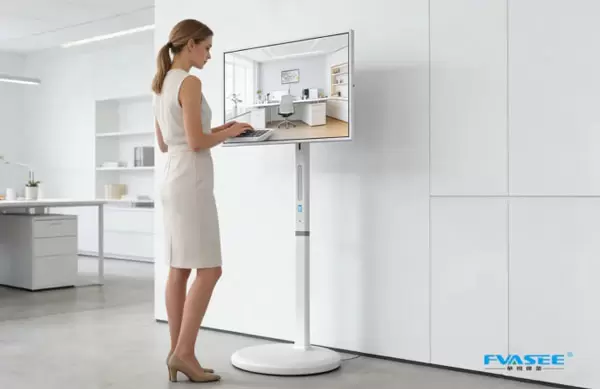
Imagine rolling a smart TV on wheels into any room. You get layout flexibility, easy setup, and quick access to smart features.
· Move your rolling smart monitor wherever you want.
· Enjoy ergonomic advantages and spatial freedom.
· Use it for entertainment, work, or learning—it's that simple!
Smart TV on Wheels Setup
Assembling the Stand
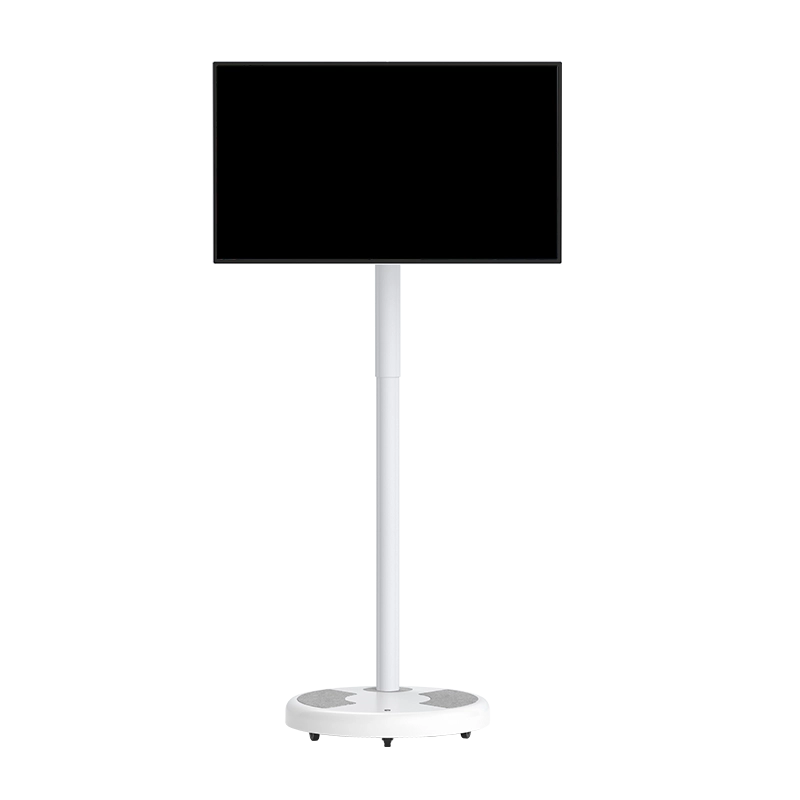
Setting up your rolling smart monitor is easier than you might think. The FVASEE Interactive Whiteboard comes with a sturdy stand that lets you move your screen wherever you need it. You just follow the instructions in the box. The multi-angle rotatable screen lets you adjust the display for the best view.
Tip: Place your rolling smart monitor on a flat surface. Check the locking mechanisms on the wheels before you start using it. This keeps your screen steady and safe.
Here are some safety steps to keep in mind:
· Don’t put snacks, toys, or decorations on the stand. Kids might try to climb up.
· Use furniture to block direct access if you have young children at home.
· Teach kids not to touch or climb on the stand.
· Inspect screws and fasteners every few months. Tighten them if needed.
· Give the base a gentle wobble test to make sure it’s stable.
The FVASEE Interactive Whiteboard uses explosion-proof tempered glass. You get extra durability and peace of mind.
Connecting Devices
Connecting your devices to the rolling smart monitor is simple. FVASEE gives you plenty of options. You can use USB, HDMI, or Type-C ports. This means you can hook up laptops, tablets, or even gaming consoles. Wireless capabilities let you connect without messy cables.
Here’s a quick look at the main ports:
Port Type | Common Use |
USB | Flash drives, webcams |
HDMI | Laptops, consoles |
Type-C | Phones, tablets |
You can also connect your mobile tv carts to other screens for bigger presentations. The FVASEE Interactive Whiteboard supports up to 20 touch points. Multiple people can interact at the same time. This is great for group projects or family movie nights.
Initial Configuration
Once your rolling smart monitor is assembled and connected, it’s time to set it up. The FVASEE Interactive Whiteboard runs on Android 13.0. You get a user-friendly interface and access to lots of apps. Adjust the brightness to match your room’s lighting. The anti-glare screen keeps everything clear.
Note: Make sure your tv carts are compatible with your devices. Check the settings for wireless connections and screen sharing.
You can customize the home screen, install your favorite streaming apps, and set up voice control. The FVASEE Interactive Whiteboard makes it easy to get started. You can use touch, stylus, or other objects to interact with the screen. This setup works for classrooms, offices, or living rooms.
Mobility Tips
Safe Moving Techniques
Moving your smart TV on wheels should feel easy and safe. FVASEE’s Interactive Whiteboard comes with built-in handles that make pushing or pulling simple. Always grip the handles firmly. Kickstands help keep the board steady when you stop. Before you roll the board, check the path for anything that could trip you up. Rugs, toys, or cords can cause trouble. If you notice unsteadiness while walking, take your time and ask for help.
Tip: Conduct a quick home safety check. Remove anything that could lead to falls. This keeps your space safe for everyone.
Stability and Locking
Stability matters when you park your smart TV. FVASEE’s wheels have locking mechanisms. Press the locks down until you hear a click. Give the board a gentle push to make sure it stays put. The explosion-proof glass and anti-glare screen add extra safety. You can trust the board to handle bumps and busy rooms.
Locking Step | What to Do |
Find the lock | Look near each wheel |
Press firmly | Listen for the click |
Test stability | Push gently |
Accessibility Benefits
A smart TV on wheels helps people with mobility challenges. You can move the screen closer if you have trouble getting in and out of chairs. The adjustable height and rotatable screen make it easy to find the best angle. Regular movement keeps muscles strong and encourages activity. If you notice any falls or near falls, talk to a healthcare provider. FVASEE’s durable design means you don’t have to worry about accidents. Everyone gets a chance to enjoy entertainment, learning, or work—no matter where they are.
Usage Scenarios
Entertainment Anywhere
Picture yourself rolling your smart tv on wheels into the living room for a movie night. You can move it to the kitchen for a cooking demo or set it up in the backyard for a family game session. The FVASEE Interactive Whiteboard makes entertainment flexible. You don’t have to worry about glare or brightness. Adjust the screen to match the lighting. The battery-powered screen lets you enjoy shows even when you’re away from outlets.
Here’s a quick look at popular entertainment uses in different settings:
Setting | Use Case Description |
Home | Smart TVs on wheels serve as family organization hubs with calendar integration and educational apps. |
Business | They are utilized for reliable business presentations, equipped with features like 4K webcams and stable connectivity. |
Education | In educational settings, these TVs function effectively as mobile smartboards, enhancing classroom interaction. |
Tip: Move your rolling smart monitor to any room. Host a movie marathon, stream music, or play games with friends. The adjustable brightness keeps the picture clear.
Work and Collaboration
Work feels easier when you can bring your rolling smart monitor right to your desk or meeting space. You can host meetings, share presentations, and brainstorm ideas. The FVASEE Interactive Whiteboard supports up to 20 touch points. Teams can write, draw, and interact at the same time. This makes pop up meetings possible anywhere. The battery-powered screen means you don’t need to hunt for a plug.
Many offices use tv carts for video conferencing. You can move the screen to different rooms, connect laptops, and start calls quickly. Collaboration becomes simple. You can share screens, annotate documents, and save notes for later.
Note: When choosing a smart tv on wheels for work, confirm the purpose. Make sure it fits your needs and works with your current equipment.
Learning and Teaching
Teachers and students love the flexibility of a rolling smart monitor. You can move it from classroom to classroom. The FVASEE Interactive Whiteboard lets students interact with lessons using fingers or stylus pens. Teachers can save and print notes made during class. This helps students review and share information.
Here’s how FVASEE supports interactive learning:
Feature Description | Explanation |
Interaction with Projected Content | Users can engage with the content using stylus pens or fingers, allowing for real-time interaction during lessons. |
Student Engagement | Students can actively participate by drawing or highlighting on the board, moving away from passive learning. |
Saving and Sharing Annotations | Teachers can save and print notes made during lessons, facilitating review and sharing with others. |
Remote Interaction | The whiteboard can connect to other devices, enabling interaction with audiences not physically present. |
You can adjust the brightness for different classrooms. The anti-glare screen keeps lessons visible. The battery-powered screen lets you teach outside or in spaces without outlets.
Tip: Use the rolling smart monitor for group projects. Students can work together, share ideas, and learn in new ways.
Events and Gatherings
Smart tv on wheels makes events more engaging. You can roll the screen into a conference room for presentations. Move it to the lobby for welcome messages. Use it outside for community gatherings. The FVASEE Interactive Whiteboard adapts to any space. You can display schedules, stream live video, or show slideshows.
For parties, set up your rolling smart monitor for karaoke or games. At business events, use it for interactive sign-ins or networking. The screen’s mobility and wireless features make setup fast. You don’t need to worry about cords or outlets.
Note: Always check product quality and after-sales service when buying tv carts for events. This ensures reliable performance and support.
Smart tv on wheels brings flexibility to every scenario. You can use it indoors or outdoors. The battery-powered screen and adjustable features make it easy to enjoy entertainment, work, learning, and events wherever you need.
Maximizing Smart Features
Streaming Apps
Streaming your favorite shows and movies feels effortless with the FVASEE Interactive Whiteboard. The Android 13.0 system gives you access to popular apps like Netflix, YouTube, and Disney+. You can download apps right from the Google Play Store. The powerful hardware keeps everything running smoothly. Just tap the app you want and start watching. The rolling smart monitor brings entertainment to any room. You can even adjust the brightness for movie nights or daytime viewing.
Tip: Pin your favorite streaming apps to the home screen for quick access. No more searching through menus!
Screen Sharing
Screen sharing makes group work and family time more fun. You can cast your phone, tablet, or laptop screen to the rolling smart monitor in seconds. This feature helps with presentations, photo slideshows, or even sharing a new recipe in the kitchen. The FVASEE Interactive Whiteboard supports many devices, so everyone can join in. You can use USB, HDMI, or wireless connections. The rolling smart monitor lets you switch between devices without hassle.
Device Type | Connection Option |
Laptop | HDMI, Wireless |
Tablet | Type-C, Wireless |
Smartphone | Wireless, USB |
Voice Control
Voice control adds a new level of convenience. You can use your voice to open apps, search for videos, or adjust the volume. The rolling smart monitor listens and responds quickly. This feature is perfect when your hands are full or you want to keep things simple. You can even ask for the weather or set reminders. The FVASEE Interactive Whiteboard makes daily routines easier with smart voice commands.
Maintenance and Safety
Cleaning and Care
Keeping your smart TV on wheels clean helps it last longer and look great. Use a soft, dry cloth to wipe the screen and frame. Avoid harsh cleaners or spraying liquid directly on the glass. FVASEE’s explosion-proof tempered glass makes cleaning easy and safe. For the wheels, remove dust and hair that can build up over time. You can use a damp cloth for stubborn spots. Regular cleaning keeps your tv carts rolling smoothly and your display looking sharp.
Tip: Clean the wheels and base every week. This prevents dirt from scratching your floors.
Checking Connections
Loose cables can cause problems with sound or picture. Check all your connections once a month. Make sure USB, HDMI, and Type-C cables fit snugly. Look for any frayed wires or bent plugs. If you notice damage, replace the cable right away. Inspect the wheels and locking mechanisms too. Lubricate the wheels if they squeak or feel stiff. Center the TV’s weight over the base for better stability. These steps help your tv carts stay safe and reliable.
What to Check | How Often | Why It Matters |
Cables & Ports | Monthly | Prevents signal issues |
Wheels & Locks | Weekly | Ensures smooth movement |
Screen & Frame | Weekly | Keeps display clear |
Preventing Accidents
Safety comes first, especially around kids and pets. Place your smart TV on a flat surface and lock the wheels when not moving. Teach children not to climb or hang on the stand. Use felt pads under the base to protect your floors. If you have pets, keep cords out of reach to avoid chewing. FVASEE’s anti-glare, tempered glass adds extra protection. If you ever need help, FVASEE’s customer support team is ready to assist you 24/7.
Remember: A little care goes a long way in keeping your smart TV safe for everyone.
A smart tv on wheels changes your routine. You get easy setup, smooth mobility, and practical uses every day. Try these tips for a better experience. FVASEE stands out with strong quality and support.
Feature | FVASEE's Smart TV on Wheels | Competitors' Offerings |
Product Usability | High | Varies |
Lifestyle Integration | Strong | Limited |