English
 Italian
 Spanish
 Turkish
 Portuguese
 Dutch
 Korean
 Russian
 French
 German
 Polish
 Arabic
 Hindi
Can You Use a Portable Smart TV as a Gaming Monitor? What Gamers Should Know
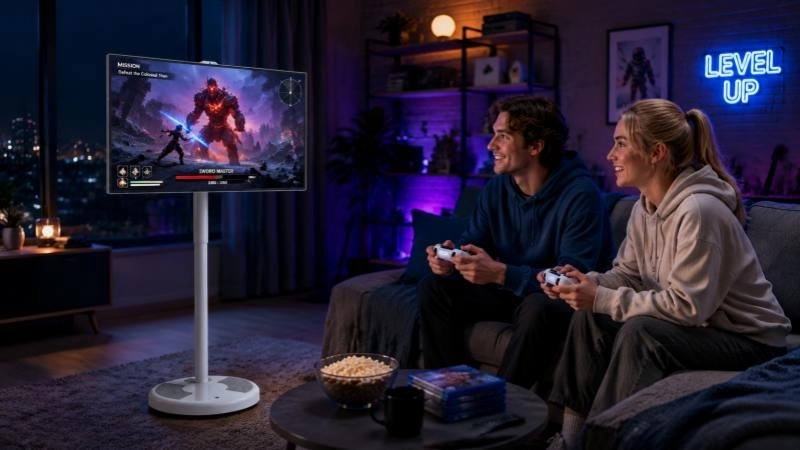
Gaming screens are no longer limited to fixed desks or dedicated entertainment rooms. Some players want a larger display for console games in the living room, while others need a screen that can move between a bedroom, study, and shared family space. This has brought portable smart TVs into the conversation as another option for gaming.
A portable smart TV can support several gaming activities, including console gaming, cloud gaming, and mobile screen mirroring. Its rolling stand, built-in smart system, and flexible placement make it useful for casual and shared entertainment. However, it does not automatically offer the same performance as a dedicated gaming monitor. Screen refresh rate, input response, connection options, and compatibility still matter.
For buyers considering a portable smart TV for gaming, the important question is not simply whether games can run on the screen. It is whether the display fits the way they play.
Portable Smart TV vs. Gaming Monitor: What Is the Actual Difference?
Both devices can display game content, but they are designed around different priorities.
A gaming monitor is generally built for a more focused gaming setup. Its performance specifications may include a high refresh rate, low input lag, fast response time, and dedicated display connections. These features are particularly important for competitive players who need quick visual feedback.
A portable smart TV takes a broader approach. It combines a display with smart entertainment functions and, depending on the model, a mobile stand, wireless connectivity, and optional battery power. Gaming is one of its possible uses rather than its only purpose.
Buying consideration | Portable Smart TV | Dedicated Gaming Monitor |
Main purpose | Entertainment, smart applications, and flexible viewing | PC and console gaming |
Placement | Often designed for movement between rooms | Usually placed on a desk or fixed gaming station |
Smart functions | Built-in smart system on supported models | May require an external device |
Screen size | Available in different portable screen sizes | Wide range, including large and ultrawide formats |
Gaming performance | Depends on the exact model and specifications | Often offers gaming-focused performance options |
Shared entertainment | Suitable for family and group viewing | More commonly used by one player |
Mobility | Rolling stand and optional battery configurations on selected models | Usually limited |
The distinction becomes clearer when considering how the screen will be used.
A player who spends most of the time competing in fast-paced online games may benefit more from a dedicated gaming monitor with verified high-refresh-rate and low-latency specifications. Someone who plays console games occasionally, watches streaming content, and wants to move the screen around the home may find a portable smart TV more practical.
The two categories serve different priorities. Buyers should compare the actual specifications and intended use rather than assume one can replace the other in every situation.
Can a Portable Smart TV Connect to a Gaming Console?
Console compatibility is one of the first things to check when choosing a portable gaming display.
PlayStation, Xbox, and Nintendo Switch users generally need a suitable video input on the display. The exact connection method depends on the console, the display model, and any required accessories. A portable smart TV with a compatible HDMI input can be used as an external screen for a supported console.
Before purchasing, check the following details:
l Available video inputs: Confirm that the display has the connection required by the console. Do not assume every portable smart TV includes the same ports.
l Supported resolution: Check the maximum resolution supported by both the display and the connection.
l Refresh rate: Confirm the refresh rate at the resolution you intend to use. A screen's advertised resolution alone does not establish its gaming performance.
l Audio output: Check whether sound comes through built-in speakers, headphones, or an external audio device.
l Console compatibility: Verify the connection requirements of the exact console and display model.
For example, a player using a console in the living room may want a screen that can later be moved to a bedroom. A portable smart TV with a suitable input and rolling stand can make this arrangement easier. There is no need to keep a separate gaming display permanently installed in every room.
However, connection compatibility should be confirmed before ordering. Smart TV functions and wireless screen casting do not replace a physical video input when a console requires a direct wired connection.
Screen Size and Viewing Distance Matter More Than Buyers Expect
A gaming display should suit the distance between the player and the screen. A larger display can make racing games, sports titles, and adventure games more immersive, but screen size alone does not guarantee a better experience.
Portable smart TVs are available in different screen sizes, including 21.5-inch, 24-inch, 27-inch, and 32-inch options in the FVASEE range. Each size serves a slightly different arrangement.
Screen size | Potential use | Points to consider |
21.5-inch | Compact gaming corners and close viewing | Takes up less space but provides a smaller viewing area |
24-inch | Bedroom desks and personal entertainment | A practical size for closer viewing |
27-inch | Mixed gaming and everyday entertainment | Offers more screen space while remaining relatively portable |
32-inch | Living room gaming and shared viewing | Better suited to users who prefer a larger display, subject to available room |
A 27-inch or 32-inch portable smart TV may be worth considering for players who want a balance between viewing area and mobility. The final choice should still account for the room layout, viewing distance, and the type of games being played.
For close-range gaming, a screen that is too large may require frequent eye or head movement. For group gaming, a larger display can make it easier for several people to follow the same action. The best size is therefore linked to the viewing arrangement rather than a universal recommendation.
Refresh Rate and Input Lag: Two Specifications You Should Not Ignore
A portable smart TV may be suitable for casual gaming, but buyers who care about responsiveness should examine its performance specifications carefully.
Two terms deserve particular attention: refresh rate and input lag.
Refresh rate refers to how many times the display updates its image each second. It is measured in hertz (Hz). A higher refresh rate can provide smoother motion when the connected device and display both support it. This can be useful in fast-moving games, although the actual result also depends on the console or computer, game settings, and connection.
Input lag describes the delay between a player's command and the corresponding action appearing on the screen. Lower input lag is generally preferable, especially in competitive games where timing matters.
Response time is another specification worth checking. It describes how quickly a pixel changes from one state to another and can affect motion clarity. It is related to, but not the same as, input lag.
These figures should not be confused with resolution. A display can offer Full HD resolution without necessarily having the refresh rate or response characteristics expected from a gaming monitor.
For buyers evaluating an FVASEE portable smart TV, the recommended approach is to request the detailed specification sheet for the intended model. Confirm the native refresh rate, supported input resolution, response time, and available gaming-related settings before making a decision. If these figures are not published, ask the supplier rather than relying on assumptions based on screen size or smart features.
Which Gaming Types Are Suitable?
The required display performance varies according to the game.
l Racing and sports games: Players often value smooth movement and a larger viewing area. Refresh rate and response time are worth checking.
l Adventure and role-playing games: Visual presentation and comfortable viewing may be more important than competitive response speed for many players.
l Casual and family games: A portable screen can be useful when several people want to play or watch together.
l Competitive shooters and fighting games: Input lag, refresh rate, and response time become more important. A gaming monitor with verified performance specifications may be the more appropriate choice.
This distinction helps buyers avoid paying for features they do not need or choosing a screen that cannot meet their expectations.
Three Ways to Use a Portable Smart TV for Gaming
A portable smart TV can support different gaming arrangements. The connection method and available applications will depend on the model and the gaming device.
1. Console Gaming
Console gaming is one of the most straightforward applications when the portable smart TV has a compatible video input.
The console connects to the display through the required cable, while the controller communicates with the console according to the console manufacturer's setup. Players can arrange the screen in a living room, bedroom, or another suitable indoor space.
This setup is useful for people who do not want a permanent gaming station. After playing, the screen can be moved to another room for streaming or general entertainment, provided the model's stand and power arrangement support the move.
Before choosing this setup, check the display's physical ports and supported video formats. A built-in Android system does not by itself confirm compatibility with every console.
2. Cloud Gaming
Cloud gaming offers another way to play without relying entirely on a locally installed game library. The game runs on a remote server and streams video to the user's screen, while player input is sent back through the network.
A portable smart TV may be used for cloud gaming when its operating system, supported applications or browser, and network connection meet the platform's requirements.
Several factors affect the experience:
l The cloud gaming service must be available in the user's region.
l The display must support a compatible application or access method.
l The internet connection should be stable enough for continuous game streaming.
l The controller must be compatible with the service and device.
l Network delay can affect responsiveness, even when the display itself performs well.
Cloud gaming should not be treated as a guaranteed built-in function of every smart TV. Buyers should check the supported platform and application requirements for the exact model and their intended service.
3. Mobile Gaming on a Bigger Screen
Some players prefer mobile games but want a larger screen when playing at home. Wireless screen mirroring can display compatible smartphone or tablet content on a portable smart TV.
This arrangement may work well for casual games, group entertainment, and games that do not depend on extremely fast input response. It also makes it easier for other people in the room to watch the game.
There is one important limitation: wireless mirroring can introduce additional delay. The result depends on the phone, display, wireless network, and mirroring method. For fast-paced games that require precise timing, a direct connection or another supported gaming setup may be more suitable.
Why the Rolling Stand Changes the Gaming Setup
The physical design is one of the main differences between a portable smart TV and a conventional fixed television.
A rolling stand allows the screen to be repositioned without installing a wall bracket or keeping it on the same cabinet. For households with limited space, this can make a difference to how often the display is used.
Consider a few common arrangements:
Living room: The screen can be positioned near a sofa for console gaming and moved aside when the room is needed for other activities.
Bedroom: A compact model can serve as a personal entertainment screen without requiring a permanent TV cabinet.
Home office: The display can be used for casual gaming outside working hours, while its smart functions may support other entertainment needs.
Shared family space: A movable screen can be positioned where several people can see it, making casual multiplayer games easier to enjoy together.
Height adjustment and screen orientation are also worth checking. FVASEE models offer different configurations, and the exact adjustment range and rotation functions should be confirmed against the selected product. A stand that moves easily on the floor is useful, but it should also remain stable during normal use.
For households that value flexible room layouts, this mobility may be more important than a small difference in screen size.
Do Smart Features Make a Portable TV Better for Gaming?
Smart features add convenience, but they should be evaluated separately from gaming performance.
An Android-based portable smart TV can provide access to supported streaming applications, online content, and other smart functions. This means the screen may continue to be useful even when the console is switched off.
For example, a user might play console games in the evening, watch streaming content later, or use supported applications for general entertainment. Wireless connectivity can also make it easier to share content from compatible smartphones and tablets.
Some FVASEE configurations offer touchscreen options, while selected models may include battery-powered configurations. These features can support different use patterns, but they are not necessarily standard across the entire product range.
Touch functionality is not a replacement for a gaming controller. Most console games are designed around their own controller systems, and touchscreen support depends on the game and connected device.
The same care applies to battery power. A built-in battery can reduce dependence on a nearby power outlet, but buyers should confirm battery availability, capacity, and expected operating time for the exact model. A battery option should not be assumed to be included in every configuration.
Portable Smart TV or Gaming Monitor: Which One Should You Choose?
The right choice depends on how gaming fits into everyday life.
A dedicated gaming monitor is generally the stronger option when gaming performance is the main priority. Players who spend long sessions in competitive shooters, esports titles, or other fast-response games should pay close attention to refresh rate, input lag, response time, and supported gaming features.
A portable smart TV may be more suitable when gaming is one part of a wider entertainment setup. Its value comes from the combination of screen mobility, smart applications, flexible placement, and the possibility of using one display for several activities.
The following guide can help narrow down the decision:
Your main requirement | More suitable option |
Competitive PC gaming | Dedicated gaming monitor with verified performance specifications |
Console gaming in different rooms | Portable Smart TV with compatible video input and a mobile stand |
Casual gaming and streaming | Portable Smart TV |
High-refresh-rate gaming | Display with a confirmed high native refresh rate |
Shared family entertainment | Larger portable smart TV, subject to room layout |
Mobile gaming on a larger screen | Portable Smart TV with compatible screen mirroring |
Cloud gaming | Compatible smart display with supported service access and stable internet |
There is no need to treat these products as direct substitutes. A gaming monitor is designed around dedicated display performance, while a portable smart TV places greater emphasis on flexibility and multiple uses.
What Buyers Should Check Before Ordering from a Supplier
For distributors, commercial buyers, and businesses sourcing portable smart TVs, product evaluation should go beyond the retail description.
A clear specification sheet helps prevent misunderstandings between the supplier and the end customer. It also makes it easier to compare models and decide which configuration fits a particular market.
The following points are worth confirming with the manufacturer:
1. Display specifications: Native resolution, refresh rate, brightness, response time, and supported video formats.
2. Connection options: HDMI input, USB ports, audio output, wireless connectivity, and any other required interfaces.
3. Operating system: System version, application compatibility, available updates, and regional restrictions.
4. Stand configuration: Wheel design, height adjustment, screen rotation, tilt range, and overall stability.
5. Power options: Standard power supply, battery availability, battery capacity, and operating time where applicable.
6. Touch options: Whether the selected model is touchscreen or non-touch, and how touch input works with connected devices.
7. OEM/ODM requirements: Logo placement, packaging, hardware configuration, software customization, and market-specific requirements.
For OEM and ODM projects, the intended gaming use should be communicated early. A model selected mainly for casual entertainment may have different priorities from one intended for console gaming in a retail or hospitality environment.
Suppliers should also clarify which features are standard and which are optional. This is particularly important for battery configurations, touchscreens, screen rotation, and connection interfaces. A detailed model-by-model comparison is more useful than a general product catalogue when a buyer needs to make a purchasing decision.
A Practical Choice for Flexible Gaming and Everyday Entertainment
A portable smart TV can be a useful gaming display when the expected experience matches its specifications. It offers a different approach to home gaming by combining a movable screen, smart entertainment functions, and flexible room placement.
For casual console gaming, family entertainment, mobile screen mirroring, and supported cloud gaming, this combination can make sense. Buyers who prioritize competitive performance should still compare refresh rate, input lag, response time, and connection support with dedicated gaming monitors.
FVASEE offers portable smart TV options in different screen sizes and configurations, with features such as rolling stands, smart system functions, wireless connectivity, and selected optional configurations. The most suitable model depends on the intended gaming device, room layout, and required display performance.
For detailed model specifications, connection options, and OEM/ODM requirements, contact the FVASEE team to discuss the configuration that matches your market and application.