 English
 Italian
 Spanish
 Turkish
 Portuguese
 Dutch
Dutch Korean
 Russian
 French
 German
 Polish
 Arabic
 Hindi
HindiHow Can an Interactive Flat Panel Make Preschool Lessons More Engaging?
Preschool teaching requires a different approach from lessons designed for older students. Young children are still developing their language skills, coordination, memory, and ability to follow instructions. A concept that seems straightforward to an adult may need to be explained through pictures, familiar objects, movement, and repeated activities before children can make sense of it. Teachers must also keep the class involved while ensuring that each activity remains appropriate for the children's age and learning needs.
These requirements make classroom presentation an important part of early childhood education. Printed cards, storybooks, physical learning materials, and teacher demonstrations remain valuable, but some lessons benefit from additional visual resources and opportunities for interaction. An interactive flat panel for education gives teachers another way to present information, demonstrate ideas, and invite children to participate in classroom activities.
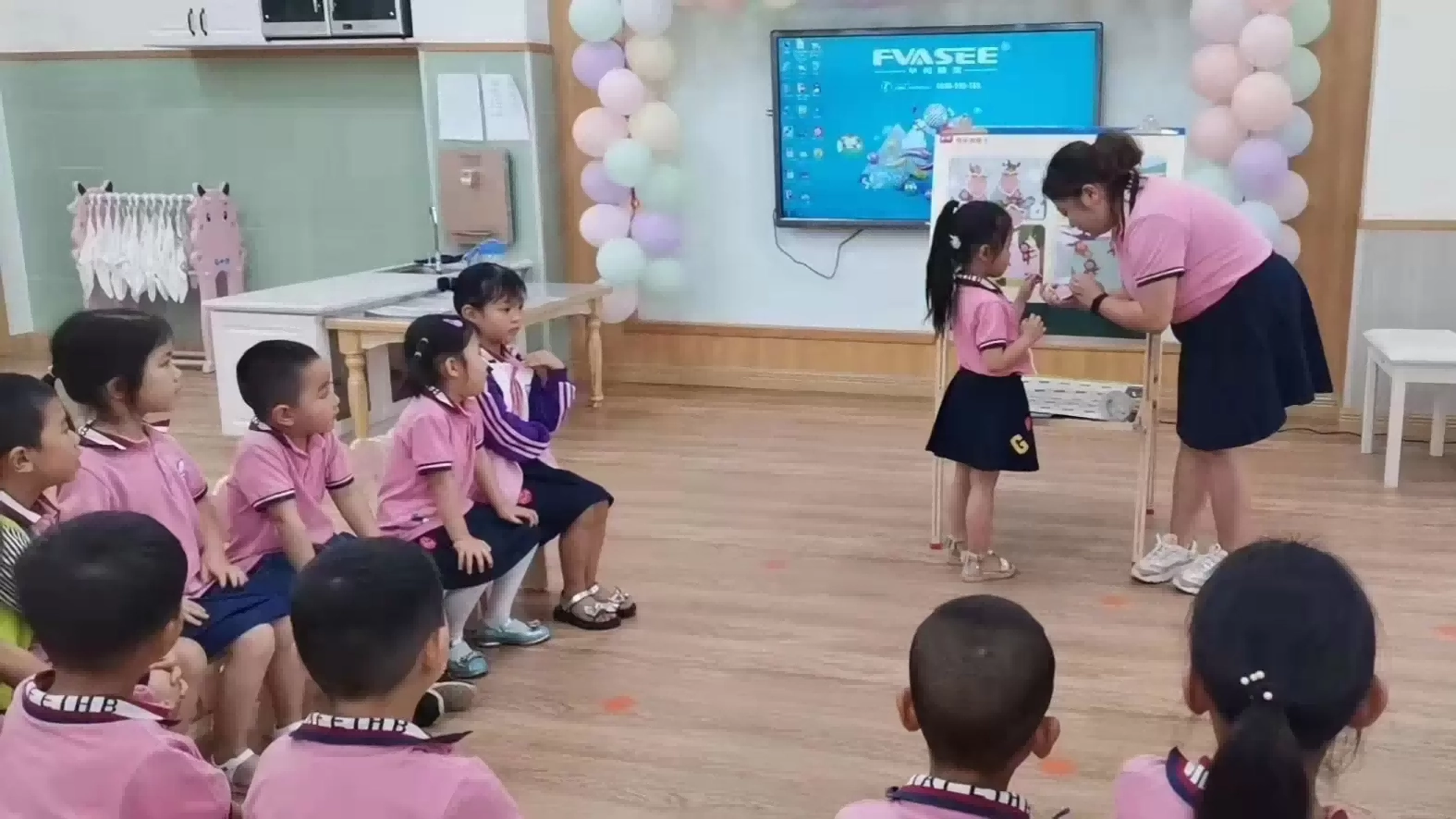
FVASEE's collaboration with Shenzhen Juxin Kindergarten provides a practical example of this application. The kindergarten introduced the FVASEE HS-ESX55 interactive flat panel into its classroom teaching environment as part of its digital development project. Equipped with a 4K high-definition display, multi-point infrared touch, multimedia playback, and other teaching functions, the device supports a wider range of presentation and interaction methods.
The value of an interactive display for kindergarten education depends on how well it fits the lesson. When teachers use the screen to support discussion, visual demonstration, and age-appropriate activities, it can complement established teaching methods rather than replace them.
Why Preschool Lessons Need More Than Visual Presentation
Visual materials have long played an important role in early childhood education. Teachers use illustrations to introduce new words, picture cards to teach classification, and physical objects to explain differences in shape, size, and texture. These methods give children something concrete to observe while they develop the language needed to describe what they see.
A large digital screen extends the range of materials available in the classroom. Teachers can display photographs, diagrams, text, and videos without preparing a separate physical resource for every example. They can also change the content as the discussion develops, allowing the lesson to follow children's questions and responses.
However, displaying more information does not automatically make a lesson more effective. Young children may become distracted when images change too quickly or when a screen contains too many visual elements. A useful classroom presentation should have a clear purpose, with each image, video, or interactive task connected to the learning objective.
An interactive smart screen for classroom use can support this approach by combining visual presentation with direct participation. Rather than asking children to watch a sequence of slides from beginning to end, teachers can invite them to identify objects, match pictures, trace shapes, or answer questions on the screen.
The distinction matters. A screen used only as a digital projector may improve the presentation of teaching materials, but its interactive functions create additional possibilities for participation. Teachers can choose between these methods according to the activity instead of relying on one format throughout the lesson.
Bringing Language Activities to Life With Interactive Displays
Language development is a central part of preschool education. Children gradually expand their vocabulary, learn to describe events, recognize relationships between words, and communicate their ideas to others. Pictures and familiar situations can provide useful starting points for these activities.
An interactive display for kindergarten classrooms can present a large image of a familiar setting, such as a park, kitchen, farm, or classroom. The teacher can ask children to identify objects, describe what people are doing, or group items according to their characteristics. A picture of a farm, for instance, can lead to questions about animals, food, colors, sounds, and the differences between domestic and wild animals.
Touch interaction gives children another way to respond. They may point to an object, move an image into a category, or write a word with the teacher's guidance. These activities create opportunities for children to connect what they see with the words they are learning.
Storytelling offers another practical application. A teacher can display illustrations from a story, pause at important moments, and ask the class to predict what might happen next. Children can describe a character's actions or identify details in the picture before the teacher continues reading.
Such activities should still leave room for conversation and imagination. The purpose of an interactive flat panel is not to turn every language exercise into a screen-based task. It is to give teachers another resource for presenting ideas and encouraging children to express themselves.
For schools developing digital teaching plans, this type of application is more meaningful than simply counting the number of multimedia resources available. The important consideration is whether the content helps children participate in the language activity and gives teachers a practical way to guide the discussion.
Supporting Early Mathematics Through Visual Demonstration
Early mathematics involves much more than memorizing numbers. Children begin to recognize quantities, compare sizes, identify patterns, classify objects, and understand basic spatial relationships. These concepts are easier to discuss when teachers can connect them with visible examples and hands-on activities.
An interactive flat panel for education can support a lesson on counting by displaying groups of familiar objects. Children might count the items together, identify which group contains more objects, or match a numeral to the corresponding quantity. Teachers can also display simple patterns and ask children to identify which shape or color should come next.
Shape recognition offers another example. A teacher can introduce circles, squares, triangles, and rectangles, then invite children to identify similar shapes in everyday objects. The activity can move from the screen to the physical classroom, where children look for shapes in books, toys, furniture, and learning materials.
This combination of digital demonstration and physical observation is important. A child may recognize a circle in a picture but still need opportunities to handle objects and compare their properties. The display can introduce the concept and organize the activity, while physical materials help children connect the visual example with the surrounding world.
Touch interaction may also support collaborative exercises. Children can take turns matching shapes, grouping objects, or completing a simple sequence. Teachers can observe their responses and adjust the explanation when a concept needs more attention.
The technology does not replace the teacher's judgment. The teacher remains responsible for choosing suitable exercises, deciding when to provide assistance, and ensuring that each task matches the children's current abilities. The screen is most useful when it makes an explanation easier to follow or gives children a clear way to participate.
Using Multimedia to Connect Classroom Topics With Everyday Life
Some preschool topics involve processes or environments that children cannot easily observe during a classroom lesson. Plant growth, seasonal changes, animal habitats, weather patterns, and transportation are examples of subjects that benefit from carefully chosen visual resources.
A USB multimedia playback function allows teachers to present compatible teaching materials directly through the display. HDMI input also provides a connection option for external devices that supply teaching content. These functions can help teachers organize lessons using materials from different sources.
Consider a lesson about plants. The teacher might begin with a photograph of a seedling and ask children what plants need to grow. A short video can then show changes that occur over time, followed by a discussion about sunlight, water, soil, and the appearance of new leaves. Children can compare the video with a plant they have observed in the classroom or at home.
The same approach can be used for environmental education. Pictures of different habitats can help children compare where animals live, while a teacher-led discussion connects the images with familiar experiences. During a lesson about road safety, photographs of pedestrian crossings, traffic lights, and sidewalks can support a conversation about safe behavior outside school.
The display makes these materials available within the lesson, but teachers should select content carefully. Videos need to be age-appropriate, easy to follow, and relevant to the subject. Short demonstrations with time for questions may be more useful than long periods of passive viewing.
A well-planned interactive smart screen for classroom teaching therefore serves as one part of a broader teaching process. It gives teachers more options for presenting information, while discussion, observation, play, and practical activities help children engage with the topic beyond the screen.
What Display Quality Means in a Kindergarten Classroom
A teaching display must be suitable for the physical conditions in which it will be used. Classroom lighting, viewing distance, screen placement, and the size of visual elements can all affect how easily children follow a presentation.
FVASEE's HS-ESX55 interactive flat panel features a 4K high-definition display. High resolution can help present detailed illustrations, photographs, diagrams, and text with clear image definition. For early education, this can be useful when teachers need to show small differences between objects or display picture-based learning materials to a group.
Screen size and resolution should still be considered together with classroom layout. Children sitting farther from the display need to see the main content clearly, while text and visual elements should remain large enough for the intended viewing distance. A high-resolution panel alone cannot compensate for poorly arranged content or unsuitable screen placement.
Ambient light is another consideration. Windows, ceiling lights, and reflective surfaces can create glare that makes images harder to see. The HS-ESX55 incorporates an anti-glare screen intended to help reduce distracting reflections. The actual viewing experience will depend on the room's lighting conditions and the position of the display, so schools should assess the installation environment before finalizing equipment arrangements.
The model also includes anti-blue-light display technology. This is a feature schools may consider when reviewing display specifications and viewing comfort. It should not, however, be treated as a guarantee against eye strain or vision problems. Appropriate screen-use practices, suitable brightness, regular breaks, and a balance between digital activities and other forms of learning remain important.
For kindergarten administrators, the practical objective is to create a classroom environment in which teaching materials are visible and comfortable to use. Display specifications are one part of that assessment, alongside classroom design and daily teaching routines.
Multi-Point Touch and the Role of Classroom Participation
One of the defining features of an interactive flat panel is its ability to respond to touch. The HS-ESX55 uses multi-point infrared touch technology, allowing teachers to incorporate touch-based activities into lessons.
In a preschool setting, this can support simple tasks such as tracing a line, matching pictures, sorting objects, or writing a number with teacher guidance. Depending on the teaching software and activity design, teachers can also arrange turn-taking exercises in which children come to the display one at a time or work together on a shared task.
The value of touch interaction lies in the activity it enables, not in the number of touches the hardware can recognize. A well-designed task should give children a clear instruction and an achievable objective. If the exercise is too complicated, children may focus on moving objects around without connecting the activity to the lesson.
Teachers should also establish classroom routines before using collaborative screen activities. Children need to know when to approach the display, how to take turns, and how to respond when another student is completing a task. These expectations help the interactive equipment fit into the classroom rather than interrupt its normal rhythm.
Touch-based activities can be especially useful when the teacher wants to make children's responses visible to the whole class. A child who matches two pictures or identifies a shape can explain the choice, giving the teacher an opportunity to ask follow-up questions and involve other students in the discussion.
The display does not need to be used interactively at every stage. Sometimes a teacher-led explanation or a physical activity is more appropriate. Having several teaching options available allows educators to decide when touch interaction adds value and when a different method is better suited to the learning objective.
Shenzhen Juxin Kindergarten: Applying Interactive Display Technology in Preschool Education
The collaboration between FVASEE and Shenzhen Juxin Kindergarten illustrates how digital display equipment can be introduced into a preschool teaching environment. As part of its digital development project, the kindergarten purchased the FVASEE HS-ESX55 interactive flat panel, primarily for classroom teaching scenarios.
According to the project information provided by FVASEE, the installation combines 4K high-definition display, multi-point infrared touch, multimedia playback, and multi-screen teaching interaction. The aim is to enrich classroom content and support a more varied approach to teaching activities.
These capabilities correspond with several common requirements in preschool classrooms. Teachers need to present visual materials clearly, move between different forms of content, and give children opportunities to respond to questions and demonstrations. A single interactive display can bring these functions into the classroom without requiring every activity to rely on the same teaching format.
For example, a teacher may use the screen to introduce a topic with photographs, switch to a video demonstration, and then invite children to participate in a question-and-answer exercise. Another lesson may use only a few images and a touch-based matching activity. The equipment provides options, while the teacher determines how those options support the lesson.
The project also highlights why classroom requirements should guide digital equipment decisions. A product specification can describe resolution, touch technology, and available connections, but the school must consider how the equipment will be used by teachers and children throughout the school day.
For other kindergartens planning similar upgrades, the Juxin project provides a relevant reference point for discussing the role of interactive displays in preschool education. Each school will still need to assess its own teaching methods, room layout, staff requirements, and equipment budget before deciding on a suitable configuration.
What Kindergartens Should Check Before Introducing an Interactive Flat Panel
Purchasing an interactive display involves more than comparing screen sizes or choosing the model with the longest feature list. Schools should begin by identifying the teaching activities and operational requirements the equipment is expected to support.
Teaching content and connectivity. Administrators should review the formats and sources used by teachers. USB multimedia playback and HDMI input may be useful where lessons involve locally stored media or external devices. Compatibility should be checked against the school's actual teaching equipment and content requirements.
Touch functions and classroom use. Schools should consider whether teachers intend to use collaborative exercises, handwriting, drawing, or simple drag-and-match activities. The touch functions should support those needs, and staff should have time to become familiar with the equipment before using it regularly with children.
Screen clarity and room conditions. Resolution, anti-glare properties, viewing distance, and installation position should be considered together. A practical site assessment can help determine whether the display will be visible from the main learning areas and whether lighting conditions need to be addressed.
Teacher training and operating procedures. Even a well-equipped display may be underused if teachers are unfamiliar with its functions. Training should cover basic operation, connection methods, multimedia playback, and routine troubleshooting. Schools can also prepare simple guidance on screen use and equipment care.
Maintenance and supplier support. Administrators should confirm the available warranty, service arrangements, and process for reporting technical problems. For projects involving several classrooms, consistency of configuration and clear communication with the supplier can help simplify deployment and ongoing management.
An experienced interactive display manufacturer should be able to explain the product's capabilities and limitations, clarify configuration details, and help customers assess whether the proposed equipment suits their intended application. These discussions are more useful than relying on general claims about digital transformation or classroom innovation.
How FVASEE Supports Digital Teaching Environments
Education projects often involve several parties, including school administrators, teachers, equipment distributors, and installation contractors. Each group has different concerns. Teachers need equipment that fits their teaching routines, administrators need to manage budgets and long-term use, and project partners need clear technical information and dependable coordination.
FVASEE develops interactive flat panels and other digital display products for education and commercial applications. Its work with Shenzhen Juxin Kindergarten demonstrates the use of the HS-ESX55 in preschool classroom teaching. The model's 4K display, multi-point infrared touch, anti-glare screen, anti-blue-light display technology, USB multimedia playback, and HDMI input provide a range of functions for visual presentation and classroom interaction.
When evaluating an interactive display manufacturer for an education project, buyers should review the available product specifications, quality-control arrangements, configuration options, delivery requirements, and after-sales support. Where an installation involves multiple classrooms or different school locations, confirming these details early can make project planning more straightforward.
The most suitable solution is not necessarily the one with the greatest number of features. It is the one whose functions correspond with the school's actual teaching requirements and can be used reliably within its operational environment.
Making Digital Displays a Practical Part of Preschool Education
An interactive flat panel can expand the ways teachers present information and organize classroom participation. Images and videos help introduce unfamiliar subjects, touch-based exercises create opportunities for children to respond, and multimedia connections allow different teaching materials to be used within the same lesson.
FVASEE's HS-ESX55 project at Shenzhen Juxin Kindergarten provides a practical example of interactive display technology being applied in preschool education. Its functions support a range of teaching activities, from visual demonstrations to touch-based exercises and multimedia presentations.
Successful classroom use still depends on the decisions made by educators. Teaching objectives, age-appropriate content, screen-use routines, classroom layout, and teacher preparation all influence whether the equipment adds value to a lesson.
For kindergartens considering digital teaching upgrades, the starting point should be the needs of teachers and children. When equipment is chosen for a clear purpose and integrated with discussion, play, hands-on learning, and teacher guidance, an interactive display can become a useful resource within a balanced preschool learning environment.