 English
 Italian
 Spanish
 Turkish
 Portuguese
 Dutch
Dutch Korean
 Russian
 French
 German
 Polish
 Arabic
 Hindi
HindiWhat to Look for When Buying a Portable Smart TV
Choosing a portable smart TV involves more than comparing screen sizes or checking which streaming applications are available. The stand, power supply, screen adjustment, connection options, and available space all affect how well the display fits into daily use. Buyers who plan to move the screen between rooms may have different priorities from those who mainly use it beside a desk or in a bedroom.
FVASEE offers portable smart display options in 21.5-inch, 24-inch, 27-inch, and 32-inch sizes, with configurations that may include an Android system, rolling stand, screen rotation, wireless casting, touch capability, and optional battery power. The right model depends on which features are needed and how the screen will be used.
Start with How You Plan to Use the Portable Smart TV
Before comparing specifications, consider where the display will be used most often. A screen for bedroom entertainment may have different requirements from one intended for video calls, online learning, cooking instructions, or shared viewing in a living room.
For personal entertainment, screen size, application compatibility, sound, and viewing comfort may be the main concerns. Home office users may place greater importance on connecting a laptop, displaying presentations, and adjusting the screen to a comfortable height. Families who move the display frequently may prefer a stable rolling stand and a configuration that suits different rooms.
The intended use also affects whether a touchscreen is necessary. Touch operation can be useful when users need to interact directly with compatible applications or on-screen content. For streaming, browsing, and viewing material from another device, a non-touch model may be sufficient.
Making these decisions early helps narrow the available options. It also reduces the chance of paying for functions that will rarely be used.
Which Portable Smart TV Size Is Right for You?
Screen size affects viewing comfort, portability, and the amount of space the display occupies. FVASEE's available size options include 21.5 inches, 24 inches, 27 inches, and 32 inches. Each size can suit a different combination of room layout and viewing habits.
Screen size | Suitable uses | Points to consider |
21.5-inch | Personal viewing, compact rooms, casual online content | Compact dimensions make placement easier |
24-inch | Everyday entertainment, browsing, and general home use | Offers a balance between viewing area and mobility |
27-inch | Home office tasks, video meetings, and shared viewing | Provides more room for presentations and visual content |
32-inch | Larger viewing areas, family entertainment, and presentations | Requires more room for movement and positioning |
These recommendations are general guidelines rather than strict rules. Actual comfort depends on viewing distance, screen resolution, room layout, and the type of content being displayed.
Is a 32-Inch Portable Smart TV Worth Choosing?
A 32 inch portable smart TV can be a practical option for users who want more screen space without installing a conventional television on the wall. The larger display can make films, online videos, presentations, and shared content easier to view from a suitable distance.
However, screen size alone does not determine convenience. A larger display may require more clearance when moving through doorways or positioning the stand beside furniture. Buyers should check the complete product dimensions, including the stand, rather than relying only on the diagonal screen measurement.
For smaller bedrooms, compact apartments, or workspaces with limited floor area, a 21.5-inch or 24-inch model may be easier to position. Those who frequently share content with family members or use the screen for presentations may find a 27-inch or 32-inch option more suitable.
The best portable smart TV size is the one that provides sufficient viewing space while remaining manageable in the places where it will be used.
Check the Rolling Stand Before Buying
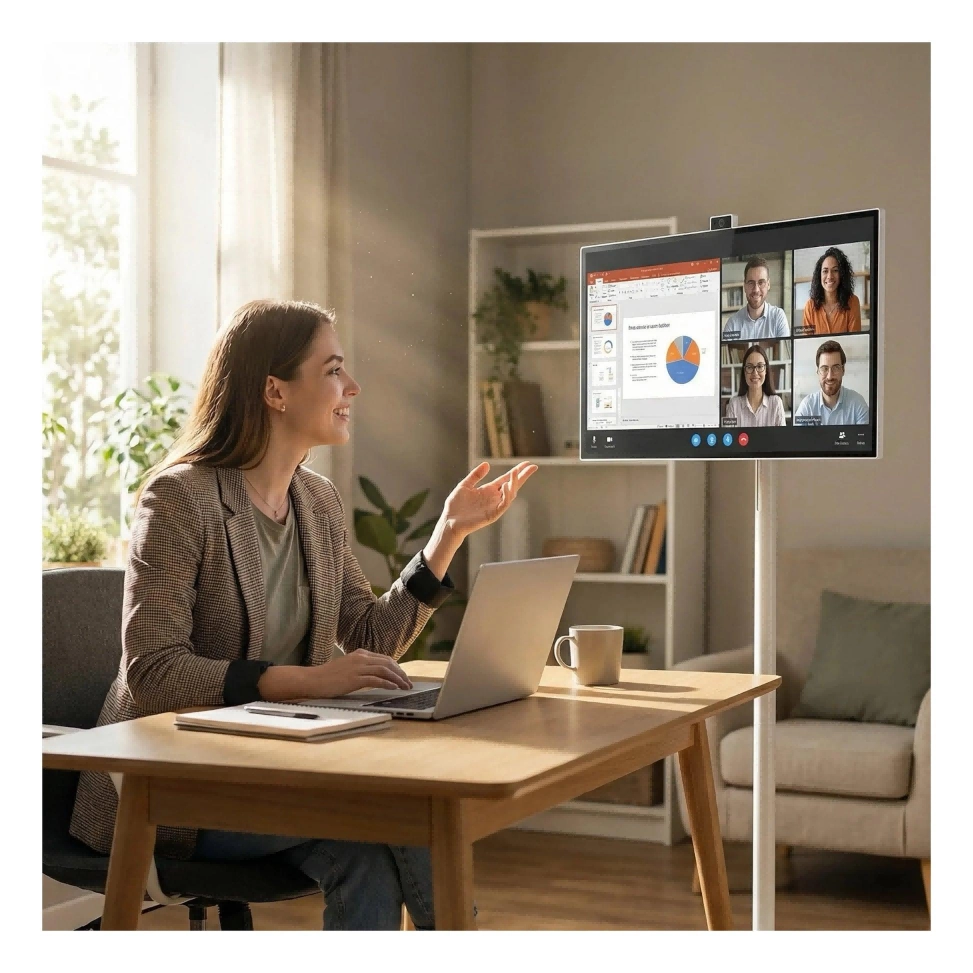
Mobility is one of the main reasons people choose a Portable Smart TV with Wheels. Instead of keeping the display in one fixed location, users can move it between suitable areas of the home. This can be useful when a screen serves as both a personal entertainment device and a shared display.
However, the quality and design of the stand matter just as much as the presence of wheels. Buyers should examine its stability, footprint, movement, and adjustment range.
Wheel design and movement: Check whether the stand can move smoothly across the types of flooring found in the intended space. Carpet edges, narrow doorways, and furniture placement can affect how easily the display moves.
Stand stability: The screen should remain stable during normal use. Consider the stand's base dimensions and follow the manufacturer's instructions for assembly and movement.
Height adjustment: An adjustable portable smart TV can help users position the display for seated viewing, standing discussions, or different seating arrangements. The available adjustment range varies by model.
Floor space: Rolling stands require room around the display. Measure the intended area and check the stand dimensions before ordering, particularly when the screen will be moved between smaller rooms.
Cable management: Power cables and connected devices can limit movement. Plan where the display will be positioned and how cables will be managed during use.
A Rolling Smart TV is most useful when its stand suits the physical layout of the home. Smooth movement, suitable positioning, and stable support are practical considerations that deserve attention before purchase.
Do You Need an Adjustable or Rotatable Screen?
Screen adjustment can make a portable display more convenient when users view different types of content or move between seating positions.
An adjustable portable smart TV may allow users to change the screen height or viewing angle. This can be useful when the display is shared by people of different heights or used in more than one room. The adjustment range should be checked against the actual product specifications.
A rotatable smart TV offers another type of flexibility when the model supports screen rotation. Portrait orientation may be useful for compatible vertical videos, mobile content, or certain reading tasks. Landscape orientation remains suitable for most films, television programs, and presentations.
Buyers should distinguish between physical screen rotation and automatic image rotation. Turning the panel does not necessarily mean that every application or connected device will automatically adjust its content. Compatibility depends on the display system, application, and connection method.
When evaluating a portable TV with adjustable screen functionality, check the supported rotation range, tilt angle, height adjustment, and operating instructions. These details help establish whether the adjustment features will be useful in everyday use.
Battery-Powered Smart TV or Standard Power Supply?
Power configuration is another important factor when selecting a portable display. Some users want to move the screen to locations where power outlets are inconvenient, while others mainly use it near a desk or sofa.
A battery powered smart TV can offer more freedom in positioning the display, depending on its battery capacity and configuration. Optional battery-powered versions may suit flexible home layouts, temporary viewing arrangements, or situations where users prefer not to keep the display connected to a power outlet during use.
The term battery operated TV can refer to different product designs, so buyers should verify the actual power arrangement instead of assuming that all portable models are cordless. Important specifications include battery capacity, expected operating time under stated conditions, charging requirements, and whether performance changes with brightness or other settings.
A portable smart TV with battery power may be convenient for moving between rooms, but battery life should match the intended viewing sessions. The supplier should confirm the available battery configuration and provide applicable operating specifications for the selected model.
Models that rely on a standard power supply can be suitable when the display stays near an outlet for most of the day. This setup may work well in a home office or regular viewing area where movement is limited.
The decision should be based on the balance between mobility and daily power requirements. Buyers who rarely move the screen may not need battery power, while frequent movement can make it a useful option.
Check the Smart System and Wireless Connectivity
The smart system determines how users access applications and online content. FVASEE portable smart display options include Android configurations, but application availability and system specifications can vary by model.
Before choosing a Wireless Smart TV, confirm whether the applications you use are supported on the selected system. Check the operating system version, available application services, network requirements, and any relevant regional restrictions.
Wireless screen casting is another feature worth checking. It can allow compatible smartphones, tablets, or computers to share content on the display without a direct video cable. However, supported protocols and device compatibility differ, so buyers should confirm which devices can connect and whether additional software or network setup is required.
Wired connections may still be important. HDMI can be useful when connecting a compatible laptop, computer, or other video source. USB ports may support particular peripherals or media functions, depending on the model. Check the available ports and supported functions rather than assuming that every connection type serves the same purpose across all products.
For home office use, consider whether the display can work with the existing computer and meeting setup. For entertainment, application compatibility and reliable network access may be more important. Matching connectivity to the intended task can prevent avoidable problems after installation.
Touchscreen or Non-Touch Model?
Touch capability can influence both the price and the way a portable display is used. A touchscreen model may suit users who want direct interaction with compatible applications, digital learning content, or on-screen controls. It can also be relevant to certain presentation and demonstration tasks.
Non-touch models may be sufficient for users who mainly watch videos, browse supported applications, or display content from another device. In these situations, the main requirements may be a suitable screen, convenient positioning, and reliable connectivity rather than touch input.
Before selecting a touchscreen portable TV, confirm how touch functionality works with the intended operating system and connected equipment. Touch support on the display does not automatically mean that every connected computer or application will support touch interaction through every connection method.
The choice should reflect actual usage. Touch capability can be useful, but it should not be treated as a requirement for every home entertainment or office setup.
Portable Smart TV Without Wall Mounting
Traditional televisions often occupy a fixed position on a wall, cabinet, or media unit. A portable smart TV without wall mounting provides another arrangement for homes where users prefer to keep the layout flexible.
The display and stand can be positioned where viewing is most convenient, then moved when the room is used for another activity. This can be useful in rental properties, shared rooms, small apartments, or homes where permanent installation is not preferred.
Nevertheless, portable does not mean that placement requires no planning. Buyers should check the stand's footprint, the complete screen height, the route between rooms, and the availability of a suitable power source. The floor surface and available clearance can also affect movement.
Wall mounting may remain appropriate for a television that will stay in one place. A portable display is worth considering when moving the screen is a regular part of its intended use.
A Practical Checklist Before Placing an Order
Comparing the following points can make the selection process more straightforward.
● Screen size: Choose a display that suits the viewing distance and available floor space.
● Stand design: Check wheel movement, stability, height adjustment, and screen rotation where applicable.
● Power configuration: Confirm whether the selected model uses a standard power supply or offers a battery option.
● Smart system: Verify the operating system and availability of the applications you need.
● Connectivity: Check HDMI, USB, wireless casting, and compatibility with existing devices.
● Touch capability: Decide whether direct screen interaction is necessary for your intended use.
● Product dimensions: Review the complete dimensions of the display and stand before planning its position.
● Warranty and support: Confirm warranty coverage, technical assistance, replacement parts, and after-sales arrangements.
● Model-specific specifications: Request confirmation of the features included in the exact model and configuration.
For business buyers, distributors, or project purchasers, it may also be useful to discuss packaging, branding, product customization, and order requirements with the supplier. FVASEE offers OEM and ODM capabilities, with available customization options subject to the specific project and model.
Choosing a Portable Smart TV That Fits Your Routine
The right Portable Smart TV should suit the way you use your space rather than simply offer the longest feature list. Screen size determines how much viewing area is available, the rolling stand affects movement and positioning, and power and connectivity options determine where and how the display can be used.
FVASEE offers portable smart display options across several screen sizes, with configurations that may include an Android system, adjustable rolling stand, screen rotation, wireless casting, touchscreen operation, and optional battery power. Available functions should be confirmed for the specific model before purchase.
For users who need a display that can move between work and entertainment areas, a well-matched configuration can provide useful flexibility without requiring permanent wall installation. Start with the main use case, compare the specifications that directly affect that task, and select a model that fits both the room and the daily routine.